

CRM dashboards are no longer just sales panels with tables and charts.
In 2026, CRM systems are becoming operational platforms for businesses. Teams now use CRM dashboards to manage leads, track customer activity, monitor pipelines, automate workflows, handle support tickets, analyze revenue, and improve customer retention.
Almost every SaaS company, agency, startup, or enterprise product now depends on some type of CRM dashboard.
For developers, CRM dashboards are one of the most common internal systems being built today.
Sometimes teams need:
- Sales CRM dashboards
- Customer management systems
- Lead tracking applications
- AI-powered CRM tools
- Team collaboration dashboards
- Analytics-focused CRM panels
- Internal business workflow systems
And most developers do not want to spend months building CRM architecture from scratch.
That is exactly why CRM dashboard templates became much more important over the last few years.
Today developers want:
- Authentication already configured
- Reusable CRM components
- Lead management layouts
- Tables and filters
- Analytics widgets
- CRM workflow pages
- Better folder structure
- API-ready architecture
- Multi-user support
- Role-based permissions
Most modern CRM dashboards are now built using:
- React
- Next.js
- Vue
- Tailwind CSS
- TypeScript
- Material UI
- shadcn/ui
- Firebase
- Supabase
- NextAuth
- TanStack Table
Now frontend developer experience matters equally.
Earlier CRM dashboards were mostly available with all frontend frameworks.
What Developers Check Before Choosing a CRM Dashboard
Today developers choose CRM dashboards based on framework and scalability instead of only design.
Most teams now check:
- Authentication support
- CRM workflow support
- Table rendering performance
- Search and filters
- Analytics capability
- Multi-user permissions
- API integration support
- Scalability
- Folder structure
- Reusable components
CRM systems are becoming long-term operational products, so frontend architecture matters much more now.
Teams now check:
- Authentication flow
- Table rendering performance
- CRM scalability
- Multi-user architecture
- AI integrations
- Search and filters
- Reusable components
- CRM workflow support
- API integration support
We tested these CRM dashboard templates based on:
- Developer experience
- CRM workflow support
- Framework flexibility
- Authentication support
- Scalability
- Table performance
- Analytics capability
- Documentation quality
- Real-world SaaS usage
This guide covers some of the best CRM dashboard templates developers are using in 2026 for SaaS products, customer management systems, analytics tools, and internal business applications.
Best CRM Dashboard Templates in 2026
| Dashboard | Best For | Frameworks Supports |
| Shadcn CRM Dashboard | AI-ready CRM systems | Shadcn UI, Next.js, Tailwind, TypeScript |
| Tailwindadmin | Lightweight CRM tools | Shadcn, React, Vue, Angular, Next.js, Tailwind |
| MaterialM | Enterprise CRM dashboards | Angular, React, Vue, Next.js, Vue, Tailwind, Shadcn, Bootstrap, Nuxt |
| Matdash | Analytics-focused CRM systems | React, Next.js, Vue, Tailwind, Bootstrap, |
| FlareLine CRM | Cross-platform CRM apps | Flutter |
| Krayin CRM | Full Laravel CRM platform | Laravel, Vue |
| DashNext | Lightweight Next.js CRM dashboards | Next.js, Tailwind |
Shadcn CRM Dashboard by ShadcnSpace
Shadcn CRM Dashboard focuses heavily on developer workflow and reusable CRM architecture.
Instead of shipping bloated CRM admin panels with unnecessary complexity, it gives developers production-ready building blocks that work naturally with modern React and Next.js applications.
The biggest advantage is flexibility.
Developers can quickly build:
- Customer management systems
- Sales dashboards
- CRM analytics panels
- AI workflow tools
- Multi-user admin systems
Because it is built on shadcn/ui patterns, developers get full control over components without fighting heavy UI abstractions.

Best For: AI CRM platforms, SaaS dashboards, multi-tenant CRM systems, enterprise customer management tools.
Key Features
- Reusable CRM components
- Lead management layouts
- TanStack Table integration
- AI-powered prompt workflows
- NextAuth, Firebase, and Supabase authentication
- Role-based access support
- Drag-and-drop CRM boards
- Analytics widgets
- Zod form validation
- Multi-layout dashboards
- Dark mode support
- RTL support
- Framer Motion animations
- Better component scalability
- Supports Internationalization (i18n)
Dashboard Examples
- CRM analytics dashboard
- Sales management dashboard
- Customer activity tracking
- Team performance panels
- AI workflow dashboard
- Revenue monitoring system
Why It Is Good for CRM Purpose
CRM systems need heavy table rendering, user management, filtering, search functionality, and scalable layouts.
This dashboard already solves most of those frontend problems using reusable architecture and enterprise-ready components.
It is especially useful for teams building AI-enabled CRM products.
Framework Compatibility: Next.js, React, Tailwind CSS, TypeScript.
Last Updated – May 2026
Tailwindadmin
TailwindAdmin works well for developers who want a simpler CRM setup without huge enterprise complexity.
Many startups only need:
- Customer lists
- Sales analytics
- Contact management
- CRM reporting
- Team dashboards
This template focuses on faster development and cleaner Tailwind-based workflows.

Best For: Startup CRM products, lightweight customer management systems, MVP dashboards, analytics panels.
Key Features
- Lightweight architecture
- CRM table layouts
- Analytics widgets
- Faster setup workflow
- Tailwind-first UI structure
- Dashboard starter pages
- Easier component customization
- Modern table systems
- User management pages
- Search and filtering support
- Clean utility-based styling
- Internationalization (i18n)
Dashboard Examples
- Sales overview dashboard
- Lead management system
- Customer analytics panel
- Reporting dashboard
- Team productivity dashboard
Why It Is Good for CRM Purpose
CRM products usually evolve very quickly.
TailwindAdmin makes it easier for developers to ship MVP dashboards faster without dealing with overly complex frontend systems.
It works especially well for startup teams and internal business tools.
Framework Compatibility: React, Next.js, Vue 3, Tailwind CSS.
Last Updated: May 2026
MaterialM
MaterialM is more focused on enterprise CRM workflows and Material Design systems.
One thing developers like about MaterialM is the amount of pre-built pages available for CRM development.
Instead of building everything manually, teams can reuse:
- CRM cards
- Customer profile pages
- Sales widgets
- Data tables
- Analytics layouts
It also includes AI workflow support which is becoming common in modern CRM applications.
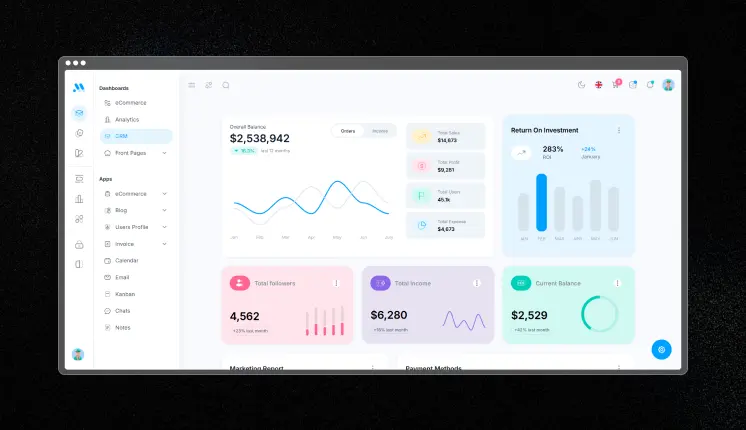
Best For: Enterprise CRM systems, reporting dashboards, customer analytics platforms, Material Design admin tools.
Key Features
- 100+ reusable UI components
- CRM-ready dashboard pages
- 690+ page templates
- ApexCharts integration
- Advanced analytics widgets
- AI prompt & libraries & workflows
- Authentication pages included
- Data tables and filters
- Calendar and scheduling apps
- Modular component architecture
- Dark and light mode
- Multiple theme layouts
- Faster dashboard development workflow
Dashboard Examples
- CRM dashboard
- Revenue analytics dashboard
- Customer management panel
- Sales reporting dashboard
- Team activity tracking
- AI prompt dashboard
Why It Is Good for CRM Purpose
CRM applications usually require many reusable business pages.
MaterialM already includes many of those workflows which reduces frontend development time significantly.
It is useful for enterprise teams building large CRM systems with analytics and reporting.
Framework Compatibility: React, Angular, Vue, Nuxt, Tailwind CSS, Bootstrap, MUI.
Last Updated: May 2026
Matdash
Matdash focuses heavily on analytics dashboards and business data visualization.Matdash works well for those use cases because it focuses strongly on chart systems and data-driven UI architecture.
Many CRM products today are becoming analytics-heavy applications.
CRM Teams want:
- Revenue tracking
- Sales forecasting
- Lead conversion metrics
- Customer activity insights
- Team performance tracking
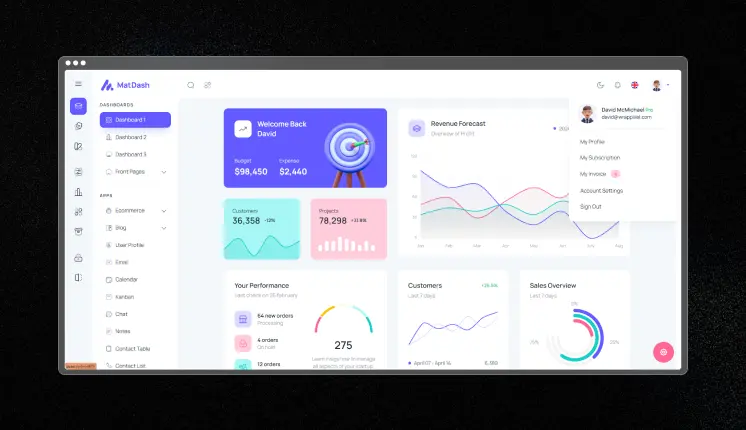
Best For: Analytics CRM systems, reporting dashboards, sales performance platforms, customer insights applications.
Key Features
- Analytics-first dashboard layouts
- KPI widgets
- ApexCharts integration
- CRM reporting pages
- Customer data tables
- Revenue visualization
- Authentication pages
- Multiple dashboard variants
- Reusable admin components
- Dark mode support
- Better dashboard navigation patterns
- Role-based admin layouts
Dashboard Examples
- Sales analytics dashboard
- Customer insights dashboard
- Revenue forecasting dashboard
- CRM reporting system
- KPI monitoring panels
Why It Is Good for CRM Purpose
CRM dashboards depend heavily on analytics and reporting.
Matdash is useful for developers building dashboards where customer data and business metrics are the main focus.
Framework Compatibility: React, Next.js, Tailwind CSS, Material UI.
Last Updated – May 2026
Looking for more “dashboard inspiration” after this article ?
Browse our “Best Dashboard Designs” blog for admin panels, analytics tools, CRM systems, and SaaS platforms.
FlareLine CRM
FlareLine CRM is different from most dashboard templates on this list.
Instead of focusing only on web dashboards, it focuses on cross-platform CRM applications using Flutter.
That means developers can use a single codebase for:
- Web
- Windows
- macOS
- Android
- iOS
For businesses building mobile-first CRM systems, this approach becomes very useful.
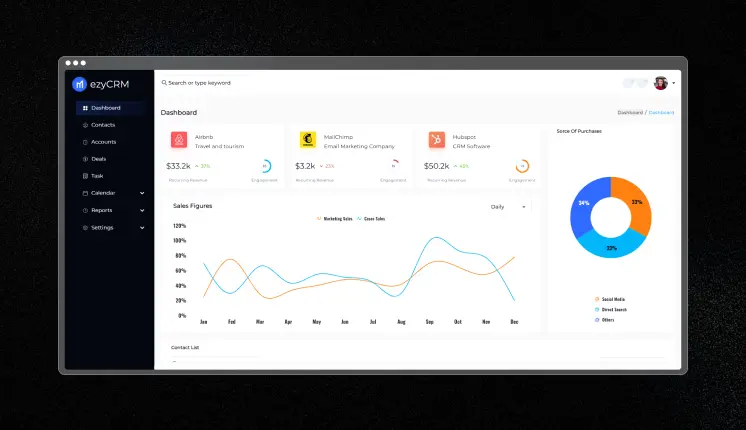
Best For: Cross-platform CRM applications, Flutter-based admin systems, mobile CRM dashboards.
Key Features
- Cross-platform CRM architecture
- Single codebase for all platforms
- Responsive Flutter layouts
- CRM dashboard starter template
- Free-to-use project
- Bloc and Provider state management
- Easier customization workflow
- Business-focused dashboard structure
- Mobile-friendly CRM architecture
Dashboard Examples
- Mobile CRM dashboard
- Customer management app
- Cross-platform admin system
- CRM analytics panel
- Sales activity dashboard
Why It Is Good for CRM Purpose
Many businesses now want CRM systems available on both mobile and desktop platforms.
FlareLine CRM helps developers build multi-platform CRM applications without maintaining separate frontend codebases.
Framework Compatibility: Flutter
Last Updated: Feb 2026
Krayin CRM Dashboard
Krayin CRM is not just a UI template. It is a full CRM system built using Laravel with integrated backend and frontend modules.
Unlike frontend-only dashboard templates, Krayin already includes:
- CRM logic
- Lead management
- Product management
- Sales pipelines
- Multi-user workflows
That makes it useful for developers who want a working CRM foundation instead of only frontend UI.
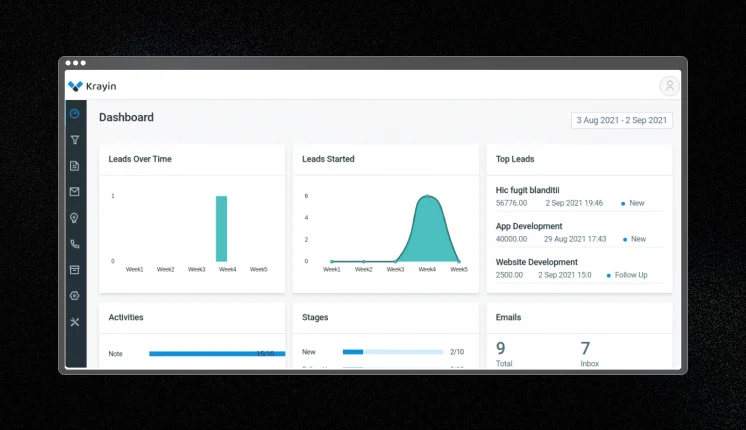
Best For: Laravel CRM systems, backend-heavy CRM applications, multi-user enterprise CRM platforms.
Key Features
- Full lead lifecycle management
- Structured sales pipelines
- Activity logging
- Modular Laravel package architecture
- REST API support
- Custom CRM attributes
- Backend and frontend integration
- Role-based access control
- Product management system
- Multi-user CRM environment
Dashboard Examples
- Lead tracking dashboard
- Sales pipeline system
- Customer management panel
- CRM activity logs
- Product management dashboard
Why It Is Good for CRM Purpose
Most CRM applications require backend workflows in addition to frontend UI.
Krayin already includes many core CRM business features which saves development time for Laravel teams.
Framework Compatibility: Laravel, Vue.js.
Last Updated: Feb 2025
DashNext
DashNext focuses on lightweight Next.js dashboard development.
Instead of shipping huge enterprise systems, it includes only the components developers actually need to build CRM and analytics dashboards.
This makes the architecture easier to understand and extend.
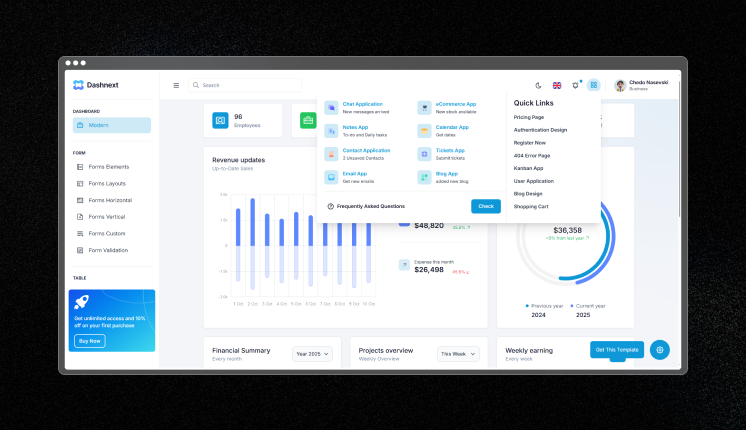
Best For: Lightweight CRM dashboards, startup SaaS products, analytics systems, Next.js CRM tools.
Key Features
- Next.js App Router architecture
- 8+ ready-to-use applications
- Chat, Notes, Calendar, Email, Contact pages
- React i18n support
- ESLint and Prettier configured
- Dashboard and login pages included
- Cleaner folder structure
- Easier onboarding workflow
- Tailwind CSS styling
- Faster CRM development process
Dashboard Examples
- CRM dashboard
- Contact management system
- Customer analytics panel
- Team collaboration dashboard
- Reporting interface
Why It Is Good for CRM Purpose
CRM products often start small and evolve over time.
DashNext works well for developers who want a lightweight CRM foundation without unnecessary enterprise complexity.
Framework Compatibility: Next.js, React, Tailwind CSS, Flowbite.
Last Updated: May 2026
FAQ’s
Which framework is Best for CRM dashboards?
React and Next.js are currently the most common choices because they provide:
- Better component ecosystems
- TypeScript support
- Faster frontend workflows
- Authentication integrations
- Strong SaaS architecture support
Laravel and Vue are also popular for backend-heavy CRM systems.
How do CRM dashboards handle large customer datasets?
Most CRM dashboards use:
- TanStack Table
- SWR
- React Query
- Server-side pagination
- Virtualized rendering
- Infinite scrolling
- Edge caching
These approaches help CRM systems manage thousands of customer records without slowing down the UI.
What features should a CRM dashboard include?
Most modern CRM dashboards usually include:
- Lead management
- Customer profiles
- Sales pipelines
- Analytics dashboards
- Team activity tracking
- Role-based access control
- Search and filtering
- Revenue reporting
- Notifications
- Workflow automation
Are AI features becoming common in CRM dashboards?
Yes.
Modern CRM systems are increasingly adding:
- AI-generated reports
- Prompt workflows
- AI customer summaries
- Automated sales insights
- Smart recommendations
- Workflow automation
Especially in SaaS CRM products.
Final Thoughts
CRM dashboards in 2026 are becoming much more than customer management tools.
They now combine:
- Analytics
- AI workflows
- Reporting systems
- Team collaboration
- Revenue tracking
- Automation systems
Which CRM Dashboard Should You Choose?
| Use Case | Recommended Dashboard |
| AI-powered CRM systems | Shadcn CRM Dashboard |
| Startup CRM products | TailwindAdmin |
| Enterprise CRM applications | MaterialM |
| Analytics-focused CRM dashboards | Matdash |
| Cross-platform CRM apps | FlareLine CRM |
| Full Laravel CRM systems | Krayin CRM |
| Lightweight Next.js CRM dashboards | DashNext |
The right CRM dashboard template can save weeks of frontend and backend development work.
For developers, choosing the right architecture early makes scaling CRM products much easier later.